Suspension Kinematics
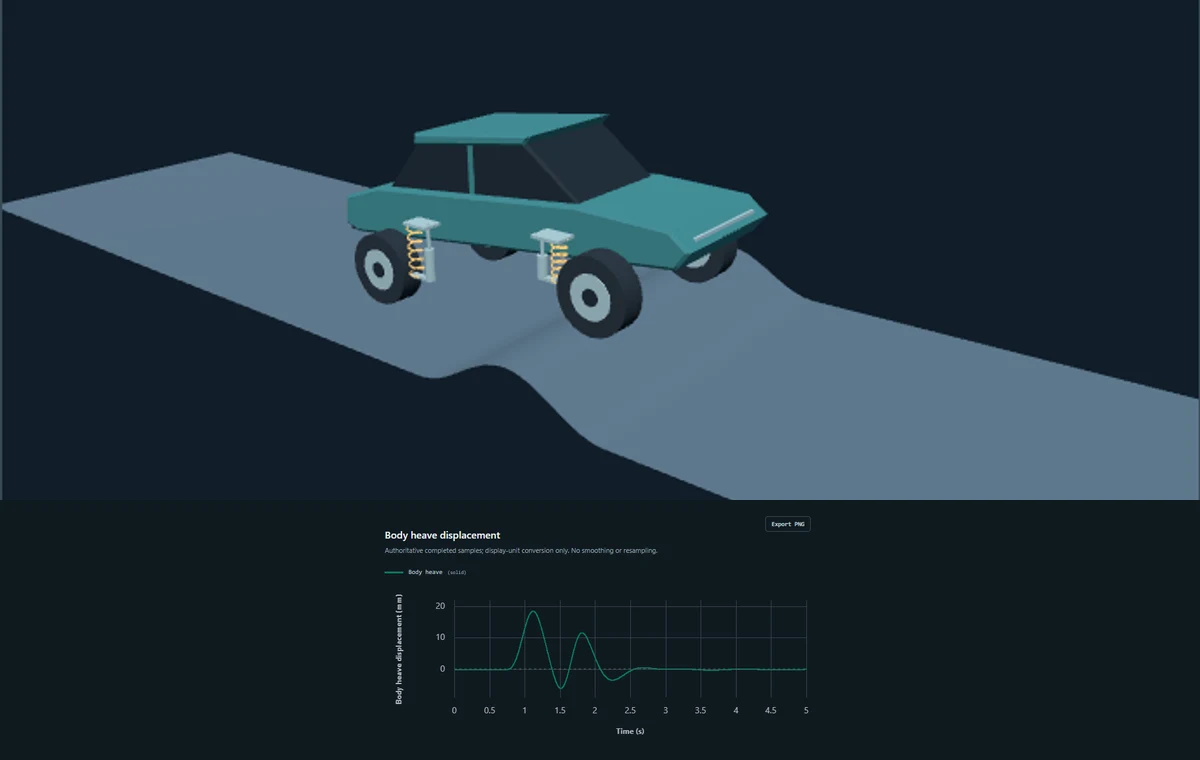
Inspect Double Wishbone hardpoints, spring/damper compression and signed motion ratios.
Inspect suspension →VehicleLab 1.21.0
Run a Full-Car over a spatial road or real OpenCRG data. Understand the response. Publish the engineering evidence. All in your browser.
Linear passive models · straight road traversal · supported OpenCRG subset
Engineering tasks
Start with an editable example and inspect the evidence supporting each model.
Inspect Double Wishbone hardpoints, spring/damper compression and signed motion ratios.
Inspect suspension →Configure Quarter, Half or Full-Car road inputs. Run, inspect Response and Motion, then export evidence.
Study ride response →Drive a passive Full-Car over procedural roads or supported OpenCRG data at prescribed speed.
Define a road →01 / Road to evidence
Define a surface or import supported OpenCRG road data.
Set speed, start position and lateral offset.
Configure a passive model and run deterministic physics.
Inspect plots, metrics and synchronized Motion.
Publish a report, video and traceable engineering data.
02 / Choose your model
Start simple, add pitch, or resolve all four corners. Each model has an explicit engineering boundary.
Body and wheel motion. A simple reference for suspension response.
Transient & Frequency · Study / Explore / Compare
Model & workflows →Body heave and pitch with separate front and rear axle inputs.
Transient & Frequency · Study / Explore / Compare
Model & workflows →Heave, pitch and roll. Prescribed corner inputs or spatial road traversal.
Transient Study · Procedural roads / OpenCRG
Model & workflows →Quarter-Car and Half-Car Explore is transient. Full-Car Compare, Explore and Frequency are not available.
03 / External road data, local computation
Import a supported ASAM OpenCRG file locally, review its domain, and define a straight traversal. VehicleLab derives four corner histories from the road surface and retains source and normalized-road fingerprints with the completed study.
Read the OpenCRG guide →Six Full-Car plots and 16 metrics. Switch to Motion to inspect the model or drive over the road.
Engineering Reports, Wide or Vertical Engineering Video, exact-channel CSV and road excitation data. Exports use the completed study.
Straight reference lines only. Curved OpenCRG roads are rejected. No steering, yaw, tire slip or contact dynamics. Spatial project saving is not available.
04 / Engineering trust
Transparent equations. Deterministic runs. Local processing. Reproducible provenance.
Verification & Validation →Model invariants, independent references, Worker parity, road and OpenCRG regression evidence, plus the published Zhao Quarter-Car numerical reproduction.
Generic passive presets have not been correlated to production vehicles. Numerical verification is not physical validation or certification. VehicleLab is not a general multibody or handling simulator.
Start with a question
No installation. No account. Your computation stays in the browser.